在前端开发中,一次性渲染大批量数据的列表是性能杀手。一次性创建数万个 DOM 节点,导致浏览器样式计算和布局耗时巨大,会造成首屏加载白屏、滚动严重掉帧。可以使用虚拟滚动 进行优化。
1.核心思想:只渲染用户“看得见”的那部分 DOM 元素
想象一个滚动的长条,虽然数据有 10000 条,但用户的屏幕(视口)只能看到 10 条。我们只需要创建这 10 个节点的 DOM,随着滚动动态更新它们的内容和偏移量。
基本组成部分:
- 外部容器(Container): 固定高度。
- 撑高元素(Phantom): 一个不可见的元素,高度等于
总数据量 * 每项高度。它的作用是让滚动条显示出正确的高度。
- 渲染列表(Visible List): 绝对定位在容器内,内容随滚动实时计算。
2. 设置变量
1.总数据量: DataSize
2.每项高度: ItemHeight
3.容器高度: ContainerHeight
4.初始化撑高元素高度: PhantomHeight = DataSize * ItemHeight
5.可视区域显示数量: VisibleCount=⌈ItemHeightContainerHeight⌉
6.当前滚动的起始索引: StartIndex=⌊ItemHeightScrollTop⌋
7.列表的偏移量: Offset=ScrollTop−(ScrollTop(modItemHeight))
3. 实现步骤
第一步:设置容器
外层容器设为 relative 定位,内部“撑高元素”高度设为 total * itemHeight。
第二步:监听滚动
监听容器的 onScroll 事件,实时获取 scrollTop。
第三步:更新数据切片
根据 scrollTop 计算出当前应该显示的 startIndex 和 endIndex,然后从原始数组中 slice 出这一段数据进行渲染。
第四步:调整偏移
因为滚动条在往下走,为了不让渲染的列表被“卷上去”,需要给列表容器设置一个 transform: translateY(${offset}px),手动将其拉回视口。
简易版虚拟滚动:
<div id="container" style="height: 400px; overflow-y: auto; position: relative; border: 1px solid #ccc;">
<div id="phantom" style="position: absolute; left: 0; top: 0; right: 0; z-index: -1;"></div>
<div id="list" style="position: absolute; left: 0; top: 0; right: 0;"></div>
</div>
<script>
const listData = Array(50000).fill().map((_, i) => `项目${i}`);
const container = document.getElementById('container');
const phantom = document.getElementById('phantom');
const list = document.getElementById('list');
const DATA_SIZE = listData.length;
const ITEM_HEIGHT = 50;
const VIEW_HEIGHT = 400;
const VISIBLE_COUNT = Math.ceil(VIEW_HEIGHT / ITEM_HEIGHT);
phantom.style.height = DATA_SIZE * ITEM_HEIGHT + 'px';
function update () {
const scrollTop = container.scrollTop;
const startIndex = Math.floor(scrollTop / ITEM_HEIGHT);
const endIndex = startIndex + VISIBLE_COUNT;
const items = [];
for (let i = startIndex; i < endIndex && i < DATA_SIZE; i++) {
items.push(`<div style="height:${ITEM_HEIGHT}px; border-bottom:1px solid #eee;">${listData[i]}</div>`);
}
list.innerHTML = items.join('');
const offset = scrollTop - (scrollTop % ITEM_HEIGHT);
list.style.transform = `translate3d(0, ${offset}px, 0)`;
}
container.addEventListener('scroll', update);
update();
</script>
|
4.优化点
在实际工程中,可进行如下优化:
- 缓冲区(Buffer): 在可视区上下额外多渲染 2-3 个元素,防止用户快速滑动时出现白屏。
const BUFFER_SIZE = 5;
function updateAdvanced () {
const scrollTop = container.scrollTop;
let startIndex = Math.floor(scrollTop / ITEM_HEIGHT);
let endIndex = startIndex + VISIBLE_COUNT;
const renderStart = Math.max(0, startIndex - BUFFER_SIZE);
const renderEnd = Math.min(DATA_SIZE, endIndex + BUFFER_SIZE);
console.log('渲染范围:', renderStart, renderEnd);
console.log('实际范围:', startIndex, endIndex);
const items = [];
for (let i = renderStart; i < renderEnd; i++) {
items.push(`<div style="height:${ITEM_HEIGHT}px;">${listData[i]}</div>`);
}
list.innerHTML = items.join('');
const offset = renderStart * ITEM_HEIGHT;
list.style.transform = `translate3d(0, ${offset}px, 0)`;
}
|
- 给每个 Item 一个预估高度。
- 在渲染后(
updated 生命周期)获取 DOM 的真实高度。
- 维护一个位置缓存表(Position Cache),记录每一项的
top 和 bottom。
5. 性能对比
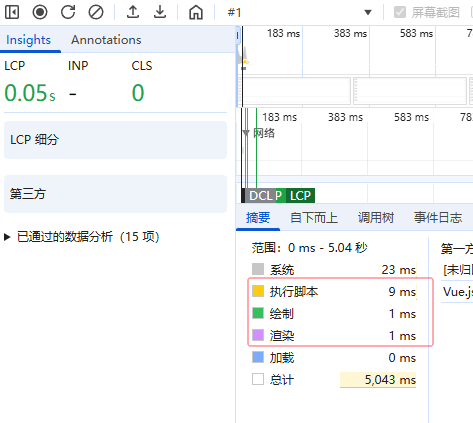
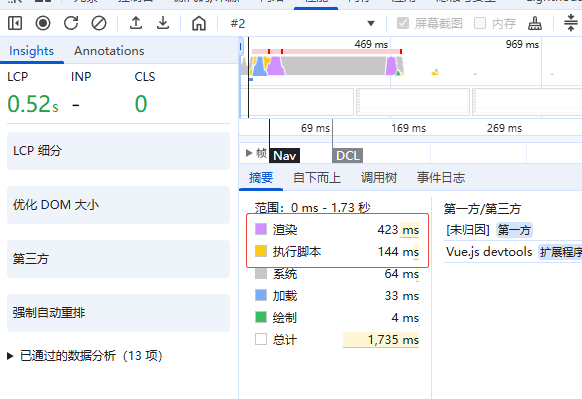
加载长度为50000的长列表,通过 Chrome DevTools 的实测:
直接渲染:
使用虚拟滚动: